


Protect Production Margin With Change Order Tracking and a 5-Day SLA

Change order tracking is the formal recording, approval, and system linkage of scope amendments so work, schedule, and billing stay aligned. The moment a client, stakeholder, or internal lead requests something outside the original brief, log it in writing and pause any new work on that item until you have documented approval. Everything else, including impact assessment, classification, and billing linkage, follows from that single discipline, and tools exist specifically to make it low-friction.
TL;DR:
A clear, central change register linked to billing and scheduling systems reduces revenue loss caused by unapproved work and missed audit trails.
Impact assessments should be completed within five business days to prevent delays and keep change requests on track.
Proper classification of changes versus revisions depends on scope, effort, and schedule impact, with fixed revision limits preventing scope creep disputes.
Role-based access control and digital signatures ensure security and a reliable audit trail for all change records.
Using short, precise amendment statements simplifies approval, enhances clarity, and speeds up the process, avoiding legalistic delays.
Projectjth
projectjth.com
Bring Production Records Into Focus
Project Relay helps manage production records, supporting clearer operations when change requests and approvals need reliable organization.
Table of Contents
Keeping Stakeholders Informed Without Drowning Them in Updates
PROJECT-JTH’s Take: Change Orders as Operational Instruments, Not Legal Traps
What Belongs in Every Change Order Record?
A change record is only useful if it answers questions later, often months later, when nobody remembers the conversation that triggered it. Skimpy logs are how scope creep takes hold: unapproved work expands without matching time, budget, or resources because nobody wrote down what changed or why.
Each entry needs these fields, at minimum:
Requestor and date: who asked, and when, so you can trace the origin.
Description of the change: what specifically is different from the approved scope.
Business reason: why the change is needed, in one sentence.
Cost and schedule impact estimate: even a rough range beats no number.
Amendment number: a sequential ID that ties this record to a specific document version.
Effective date: when the change actually takes hold, which is often not the approval date.
Approver name and timestamp: proof someone with authority signed off, and when.
A technical lead requesting an extra security scan mid-sprint, for instance, generates a record with a $1,200 estimate, a three-day schedule push, and a named approver, all logged before anyone touches the new work. Store these records in one central register, not scattered across email threads and chat messages, or you will lose the audit trail exactly when you need it.
How Do You Track a Change Request Start to Finish?
A workflow only works if people actually follow it under deadline pressure, which means it needs to be short enough to survive a busy production week. The pattern below borrows from the standard change control process of submit, assess, decide, and record, adapted for creative and technical teams that move faster than construction contracts allow.
Submit in writing. The requestor logs the change in the register or sends it through a form, not a verbal ask in a hallway or a Slack message that scrolls away.
Triage and impact check within 5 business days. The technical lead or project lead estimates cost and schedule effect. Setting a default response window keeps requests from lingering indefinitely.
Classify the request. Decide whether it is a minor revision, a billable scope change, or something to defer to a later phase.
Approve, decline, or defer. The designated approver, not just anyone with authority, makes the call and records the decision with a timestamp.
Record approval and link to billing and schedule. The amendment number, effective date, and fee adjustment get attached to the invoicing and scheduling systems immediately.
Hand off to execution. The task gets assigned only after the approval record exists. No approval record, no new work.
Finance should see cost-impact estimates before approval, not after invoicing. Technical leads own the impact assessment. The approver, whoever holds that role on your team, owns the final decision and nothing else.
Pro Tip: Assign a backup approver for every role. A single point of failure on sign-off is how urgent changes sit untouched for a week while the primary approver is traveling or out sick.
Revision or Scope Change: How Do You Tell the Difference?
Most disputes between production teams and clients trace back to one unresolved question: was that a normal revision, or did it quietly become a scope change? Creative production specialists recommend locking the elements that define a work package early, then treating anything outside that boundary as a change worth logging, per the Art Production Change Orders prevention framework.
Three questions settle most classification arguments:
Does it fit within the original brief? If the request asks for something the brief never described, it is a change, not a revision.
Does it affect an already-approved deliverable? Reopening signed-off work is different from refining work still in progress.
Does it change effort, cost, or timeline? A five-minute tweak is a revision. A tweak that adds a day of rework is a scope change regardless of how small it sounds.
A video production team might allow three rounds of client feedback on a rough cut at no extra charge. A fourth round that asks for a different narrative structure is not round four of the same revision; it is a new scope item with its own cost estimate. Setting revision limits at kickoff, in writing, and naming a single approval owner per stage removes the ambiguity before it becomes a billing argument.
Tools and Integrations That Keep Changes Auditable
A change register that lives apart from your billing and scheduling systems is a liability disguised as a spreadsheet. Producers routinely lose revenue because approved changes never get linked back to the systems that actually charge for the work or reschedule the team, an integration gap that shows up as quietly written-off hours weeks later.
The systems worth connecting to your change log:
Invoicing or ERP software, so approved cost changes generate the right line item automatically.
Scheduling tools, so a shifted deadline reflects everywhere the team checks dates.
Task assignment platforms, so nobody starts work without a linked approval record.
Document storage, for the executed amendment itself and its version history.
Notification systems, so approvers and requestors know the moment a decision lands.
Teams that skip the link between approval and billing frequently discover the gap during invoice reconciliation, not before it.
Low-friction approval matters as much as the integration itself. Mobile sign-off, delegated approvers for when the primary is unavailable, and a default 5-business-day response window keep requests moving instead of stalling in someone’s inbox. A central change register that carries amendment numbers, approval timestamps, and effective dates, connected to the billing and scheduling data teams already use, can support this pattern.
Writing an Amendment Nobody Has to Interpret Twice
An amendment that takes three paragraphs to say “we added a second location shoot for $800, effective next Monday” is an amendment people will avoid reading carefully, which defeats its purpose. The best practices for drafting contract amendments apply just as well to a production change order as to a formal legal document: check what the original agreement says about amendments, use precise replacement language, and keep a numbered version history.
One clean sentence should carry the whole change: what is different, when it takes effect, and what it costs or how it shifts the timeline. Beyond that sentence, include:
Replace or append language, stating clearly whether this amendment replaces a clause or adds to it.
An “everything else unchanged” clause, so nobody assumes the whole agreement got reopened.
Signature or approval proof, whether that is a digital signature, an email confirmation, or a logged approval in your tracking system.
Store the executed amendment in the same system as the original agreement, and reference its amendment number on the invoice line it affects. A short, specific amendment sent before work starts is what actually protects margin. Long legalistic documents just slow the approval down while the work sits idle.
What to Do When a Change Order Slips Through the Cracks
Missing approvals and billing mismatches happen even on disciplined teams, usually because someone started work before the paperwork caught up. The most common failure is a verbal “just go ahead” that never gets logged, followed weeks later by a client disputing the invoice because no written record shows they approved the extra cost.
The recovery sequence is the same regardless of what triggered the gap:
Freeze new work on the affected item immediately.
Run a rapid impact triage, even if it is rougher than your normal 5-day window.
Draft a retroactive amendment with a clear, honest effective date, not one backdated to look tidier than it was.
Reconcile billing with proration, adjusting the invoice to reflect exactly when the change actually started.
Pro Tip: If a change touches more than one stakeholder’s budget or crosses a phase boundary, escalate to a project lead before drafting the retroactive amendment. Fixing it twice costs more than fixing it right the first time.
Methods and Tools for Real-Time Change Order Tracking
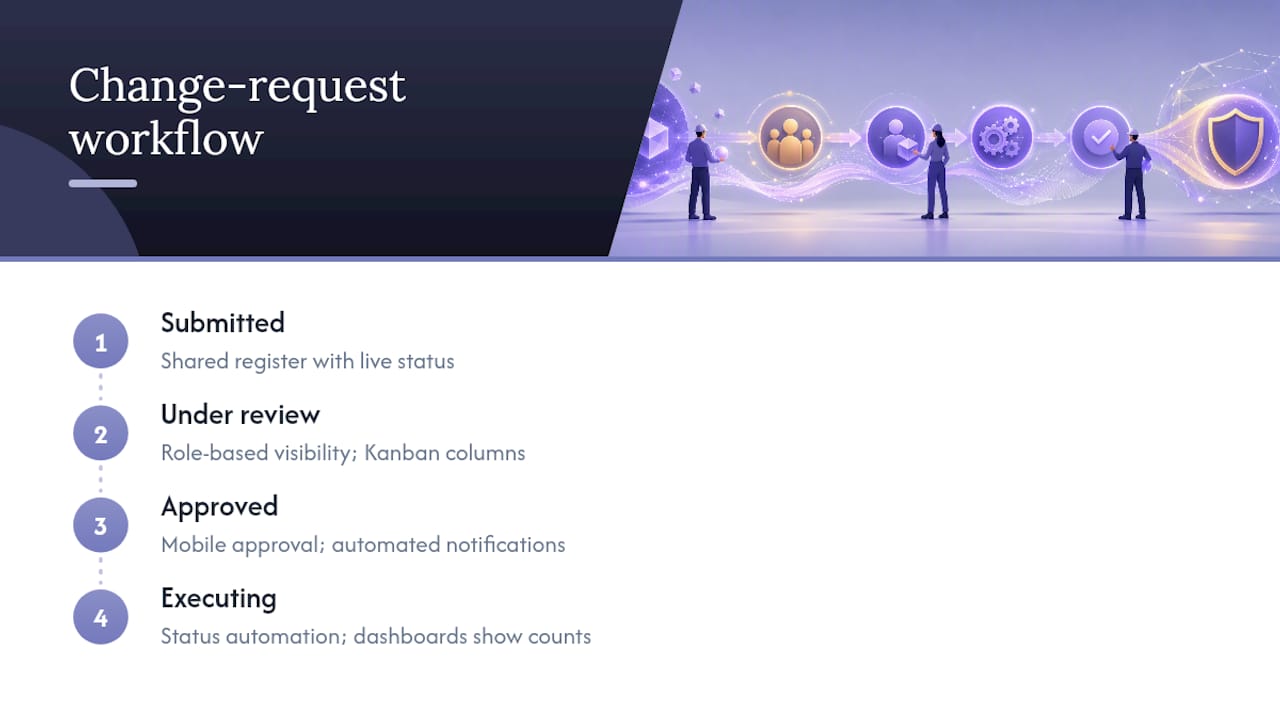
Real-time tracking means the status of a request is visible the moment it changes, not the next time someone remembers to update a spreadsheet. A shared change register with live status fields, accessible to requestors, technical leads, and approvers alike, replaces the fragmented version where each stakeholder holds a different, outdated picture of where a request stands.
Dashboards that show pending, approved, and declined counts by project let a production manager spot a bottleneck without chasing five people for updates. Kanban-style boards work well for teams already using that pattern for task management, since a change request can move through submitted, under review, approved, and executing columns using the same visual language the team already understands.
Mobile access matters more than most teams initially plan for. An approver traveling between shoot locations or client sites needs to review an impact estimate and approve it from a phone, not wait until they are back at a desk. Automated notifications tied to status changes, rather than manual check-ins, keep requests from aging silently in a queue. The tools that work best combine a structured log, role-based visibility, and status automation in one place rather than splitting those functions across three separate apps that never quite sync.
Why Change Orders Stall, and How to Keep Them Moving
The most common delay is not disagreement. It is ambiguity about who owns the decision. When a request sits in limbo because nobody is sure whether the technical lead, the finance contact, or the client-facing producer has final say, it can linger for weeks even on urgent items.
Naming a single approver per category of change, and a named backup, removes that ambiguity before it costs time. A second frequent delay comes from incomplete impact estimates: a request bounces back to the requestor for missing cost or schedule detail, then bounces again when the second draft is still thin. Setting a required-fields standard at submission, so incomplete requests simply cannot enter the queue, prevents that back-and-forth entirely.
Response time drift is the third culprit. Without a stated expectation, a request that should take two days quietly takes twelve. Setting a default service-level target, five business days for a standard impact estimate is a reasonable baseline, gives everyone a shared clock to measure against and a clear point at which to escalate. Batch-processing changes at a fixed weekly review, rather than reacting to each request the moment it lands, also reduces context-switching for technical leads who would otherwise stop mid-task every time a new request arrives.
Keeping Stakeholders Informed Without Drowning Them in Updates
Stakeholders do not need every field update. They need to know when a decision affects them, and nothing else. A notification pattern built around milestones, submitted, under review, decision made, executing, prevents the two failure modes that plague most teams: silence that makes people nervous, and noise that makes people stop reading.
Route notifications by role rather than broadcasting everything to everyone. A finance contact needs to know when a cost impact is approved, not every time a requestor edits a description field. A technical lead needs to know when a request enters their queue, not every administrative update to the register. Weekly digest summaries work well for stakeholders who need situational awareness without needing to act on each item individually, while direct, immediate alerts belong reserved for decisions that require a response within the day.
Written confirmation of every decision, even a quick one, closes the loop in a way a verbal “yes, that’s fine” never does. That confirmation becomes the audit trail entry that protects both sides if the same question resurfaces during invoicing.
Security and Access Control for Change Order Systems
A change register carries commercially sensitive information: pricing, client relationships, and internal cost estimates. Treating access control as an afterthought is how that information ends up visible to people who have no business reason to see it, or worse, editable by someone who should only be able to view it.
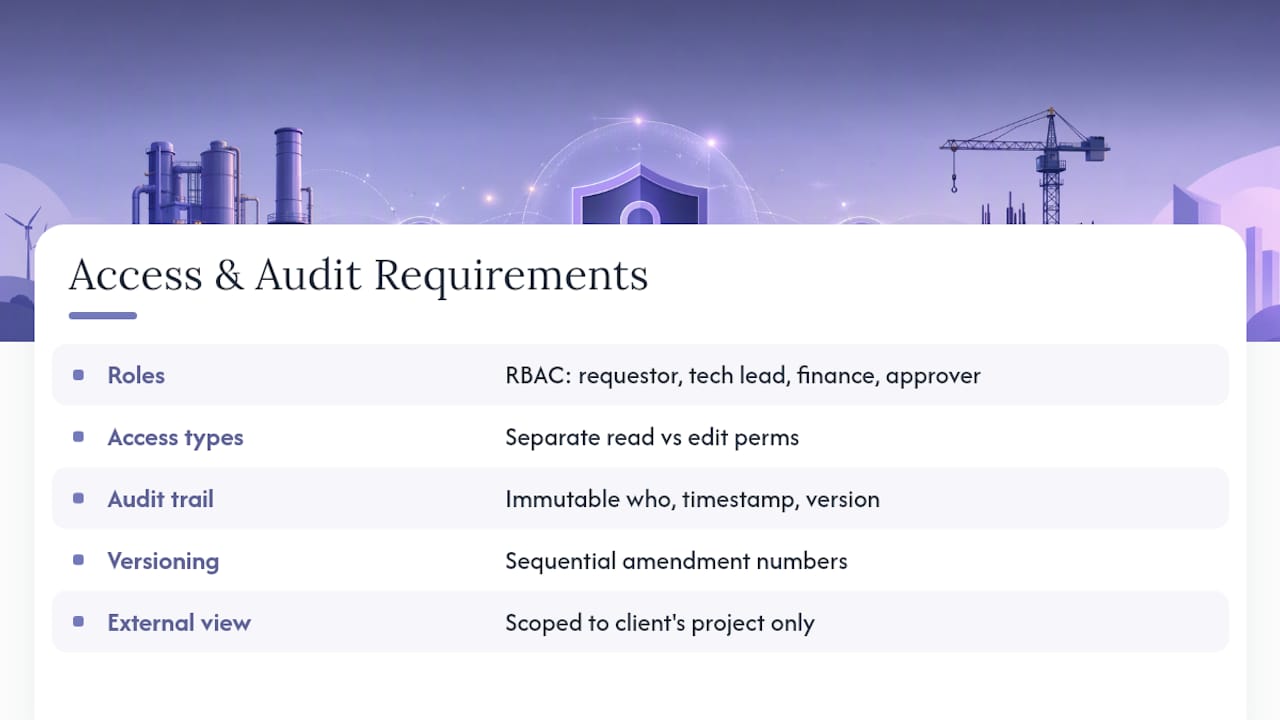
Role-based permissions are the baseline: requestors can submit and view their own requests, technical leads can see and estimate impact within their area, finance can see cost data across projects, and only designated approvers can actually approve or decline. Read access and edit access are not the same thing, and conflating them is a common mistake in systems that grow organically rather than by design.
Every approval action needs a permanent, unchangeable audit trail: who approved it, the exact timestamp, and what version of the request they were approving. If that record can be edited after the fact, it stops functioning as proof and starts functioning as a liability. Version control on the amendment itself, with sequential numbering, prevents the confusion that comes from two people editing the same request and losing track of which version is current.
External stakeholders, such as a client who needs visibility into their own project’s changes, should get a scoped view limited to their own records, never a window into the full register across every client and project the team handles.
PROJECT-JTH’s Take: Change Orders as Operational Instruments, Not Legal Traps
Most teams treat a change order like a contract dispute waiting to happen, which is exactly backwards. A change order is an operational instrument: a short, specific record that keeps money and time synchronized with actual work. PROJECT-JTH built Project Relay around that premise because the technical advisory work we do, in high-pressure production and mission-critical environments, taught us that the teams who lose margin are rarely the ones with bad contracts. They are the ones with no record at all.
The fix is not more legal language. It is a lighter, faster habit: log it, estimate it, approve it, link it to billing, then execute. Adopt that sequence for your next sprint or production cycle before you touch the next unplanned request.
— Jesse
Get Production Records and Approvals Running in One Place
Some solutions work as a central change register and approval engine, giving every request an amendment number, a named approver, a timestamp, and a direct link to the invoice or schedule it affects.

Instead of juggling a spreadsheet, an email thread, and a separate invoicing tool, your team logs the request once. Such solutions carry change requests through triage, approval, and execution handoff, with the audit trail intact the entire way. If your team is losing hours reconciling what actually got approved against what got billed, that is precisely the friction these solutions remove. Visit PROJECT-JTH to see how Project Relay fits your production workflow, or reach out directly to talk through a demo for your team.
Sources
FAQ
What Is Change Order Tracking in Production Projects?
Change order tracking is the practice of logging, assessing, approving, and recording scope amendments so cost, schedule, and billing systems stay synchronized with what a team actually delivers.
How Long Should Impact Assessment Take?
A default service-level target of five business days for a standard impact estimate keeps requests moving without forcing rushed, inaccurate cost projections.
What’s the Difference Between a Revision and a Scope Change?
A revision fits inside the original brief and approved deliverables with no added effort or cost, while a scope change alters the brief, reopens approved work, or adds meaningful time and expense.
Do I Need Special Software for Change Order Tracking?
A structured spreadsheet can work for very small teams, but tools can remove manual reconciliation by linking approval records directly to billing and scheduling systems.
What’s the Single Biggest Cause of Lost Revenue in Change Orders?
Starting new work before written approval and a linked billing record exist, which turns a legitimate scope change into unpaid labor with no documented amendment to point back to.
Written with BabyLoveGrowth to grow search and AI visibility
