


Finish Client Onboarding in 5–7 Days: 9 Item Checklist for Agencies

A client onboarding checklist works when it moves a signed engagement to first delivered value in a predictable window, typically within a short window of days, and the first action to take is issuing the contract and welcome message on the same day the deal closes. The core phases run welcome, discovery, documents, access, kickoff, and go-live. Everything past that is optimization, not the checklist itself.
TL;DR:
Most firms should complete client onboarding within five to fourteen days, with top performers doing it in five to seven days using a single portal and specific document requests.
Critical steps include signing an engagement letter, delivering a welcome message, collecting detailed documents, testing system access, and conducting a short go-live readiness check.
Using a secure client portal for documents and access requests eliminates back-and-forth delays caused by vague requests and scattered files.
Automating reminders, route requests through workflows, and assigning authority to delay go-live for incomplete steps ensure accountability and speed.
Short, focused checklists with clearly defined requirements outperform lengthy playbooks by maintaining accountability and operational consistency.
PROJECT-JTH
Bring More Clarity Under Pressure
PROJECT-JTH helps teams address operational challenges through technical advisory services, leadership training, and software solutions.
Table of Contents
What Belongs on a Client Onboarding Checklist
The list below is short by design. Long playbooks get skimmed once and ignored. This one is built to survive contact with a real client relationship, with a defined owner and a rough timing window for each step.
Signed engagement or contract (Owner: sales or account lead; Day 0). Done when the signed engagement letter is countersigned and dated, ideally through e-signature rather than a printed document.
Welcome message sent (Owner: onboarding lead; Day 0 to 1). Done when the client receives a message naming their single point of contact and a clear short expectation window.
Intake form completed (Owner: client, chased by onboarding lead; Day 1 to 3). Done when all necessary fields are fully completed.
Payment terms and invoicing confirmed (Owner: finance or account lead; Day 1 to 3). Done when the first invoice schedule is agreed upon in writing.
Documents and historical records collected (Owner: onboarding lead; Day 2 to 5). Done when all specifically requested files are uploaded to the portal.
System access and credentials granted (Owner: technical lead; Day 3 to 6). Done when each access level has been verified.
Kickoff call held and summary sent (Owner: account lead; Day 5 to 8). Done when the summary lands in the client’s inbox within 24 hours of the call.
Go-live readiness check passed (Owner: onboarding lead; Day 7 to 10). Done when documents, access, and internal owners are all verified against the checklist.
First review scheduled (Owner: account lead; Day 10 to 14). Done when a calendar invite exists for a short check-in, not a vague “we’ll follow up.”
Where to Find Ready-Made Templates
You don’t need to build these from scratch. Five documents cover most of what a service firm needs to launch a new client relationship:
Intake form or discovery questionnaire: captures scope, goals, stakeholders, and constraints before any work starts.
Welcome email template: introduces the point of contact, sets the timeline, and links the client portal.
Engagement letter or contract template: states scope, fees, and terms, built for e-signature.
Document request checklist: names each file by title, not a vague “send your records.”
Kickoff call agenda: fixed set of topics with space to record decisions made live.
Adapting these takes about two minutes per document if you keep a master version. Agencies usually add brand-voice fields to the intake form; consultants add a scope-boundary section; accounting firms add a records-retention question. Whichever format you choose, deploy through a shared portal or PM tool rather than email attachments, since scattered files are the most common source of an incomplete onboarding checklist template.
The Five-Phase Walkthrough: Onboarding Steps in Detail
A checklist tells you what to do. This section explains why each step exists and where onboarding new clients tends to break down.
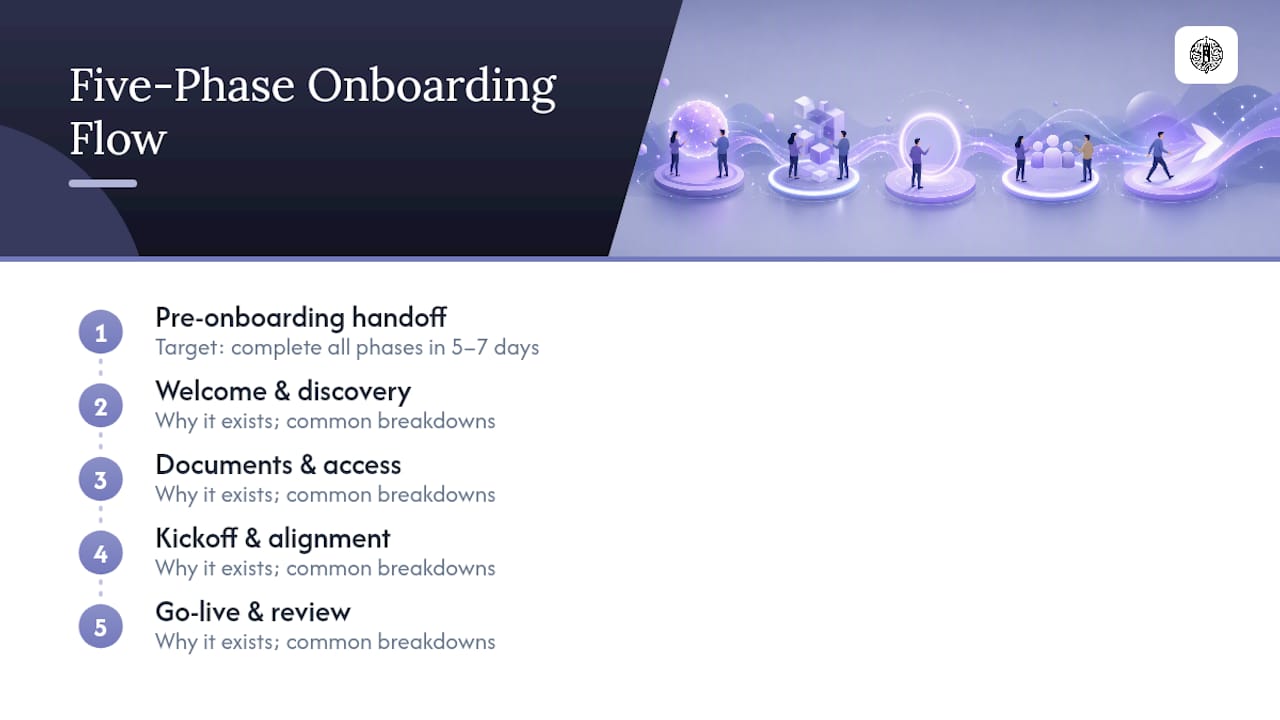
Pre-onboarding: the handoff nobody documents
Most onboarding failures start before the client ever sees anything. Sales closes a deal, then hands off to delivery with a verbal summary and a half-finished notes document. Build an internal handoff checklist that forces sales to answer: What was promised? What’s the budget? Who are the stakeholders? Pair that with a standard folder structure (contracts, intake, documents, communications) created the moment the deal closes, so the onboarding lead isn’t improvising a filing system on day one.
Pro Tip: Require the salesperson to record a two-minute voice memo summarizing the deal context before they move to the next opportunity. Written handoff notes lose nuance; a memo captures tone and unstated concerns that never make it into a CRM field.
Welcome and discovery: setting the frame
The welcome message is not a formality. A single message that thanks the client, sets a clear short expectation window, and names the point of contact does more to reduce early anxiety than any amount of polished branding. Send it the same day the contract is signed.
The intake form that follows should ask specific, closed-ended questions rather than open fields that invite paragraph answers you’ll have to parse later. Capture:
Primary goal and how success will be measured
Every stakeholder who needs visibility, with role and preferred contact method
Known constraints (budget ceilings, deadlines, prior vendor history)
Existing tools and systems currently in use
Collecting all of this in one structured pass rather than drip requests is what actually determines onboarding speed. Firms that ask for one piece of information at a time stretch a five-day process into three weeks.
Documents and access: where security matters most
This is the phase where a generic client onboarding checklist becomes a real client intake checklist, because the requests have to be specific. Instead of “send your financial records,” write “Q3 bank statement, PDF, uploaded to portal folder 2.” Named requests eliminate the back-and-forth that stalls half of all onboarding timelines.
Access requests deserve the same precision. Ask for a specific system and role, such as “QuickBooks Online accountant access” rather than a generic request for logins, since vague access requests routinely produce misconfigured permissions that get discovered weeks later. Every document request should route through a secure client portal, never email attachments. Firms that standardize on a single portal with named requests and automated reminders report completing onboarding in five to seven days, well inside the broader two-week window most firms target.
Kickoff and alignment: the call that sets the tone
Keep the kickoff agenda tight: confirm the goal, walk through the timeline, assign internal owners, and leave fifteen minutes for questions. The real value isn’t the call itself, it’s what happens after. A kickoff summary sent promptly on the same or next day of the call, documenting every decision made, prevents the slow drift where both sides remember the meeting differently three weeks later.
Go-live and review: the check most firms skip
Before declaring a client “live,” run a readiness check that verifies three things independently: all documents are collected, all access has been tested (not just granted), and an internal owner is assigned for ongoing work. This short verification step is what separates a clean handoff from the onboarding failures that surface a month later as client complaints.
Schedule a short first-week review for day 10 through 14. A 15-minute check-in at this point catches configuration errors and expectation mismatches while they’re still cheap to fix, rather than after they’ve hardened into a churn risk.
Turning the Checklist Into a Repeatable System
A checklist that lives in someone’s head or a stray document doesn’t scale past a handful of clients. Map every item to a repeating template in your project management tool, with each document request pre-loaded as a named subtask rather than a freeform note. When a new client signs, duplicating the template should take under a minute.
Not every step deserves the same treatment. Automate reminders, portal nudges, and status notifications. Keep the welcome message, kickoff call, and final handoff human. Firms that draw this line well recover a significant portion of administrative time onboarding usually consumes, without making the client feel like they’re talking to a bot.
Security has to be built into the automation, not bolted on afterward. Store API keys and passwords in a secrets manager, never in a shared document. Provide clients with magic-link portal access for uploads instead of persistent email attachments, and keep an audit trail of who accessed what and when.
Assign one internal owner (often called an onboarding lead) who holds the checklist, the folder structure, the portal invitations, and the kickoff summary from start to finish.
Automate reminders for outstanding intake fields and missing documents, similar to the patterns partner tools like a marketing automation checklist use for follow-up sequencing.
Route document uploads through a workflow automation platform or secure portal rather than email, keeping a timestamped record of every file received.
Pro Tip: Give your onboarding lead explicit authority to delay go-live if a document is missing or an access grant hasn’t been tested. A checklist only works if someone has permission to enforce it, not just track it.
Record-keeping can use structured production records instead of scattered files, a pattern that translates directly to client onboarding when the volume of documents and handoffs grows beyond what a shared drive can handle cleanly.
Why Shorter Checklists Beat Longer Playbooks
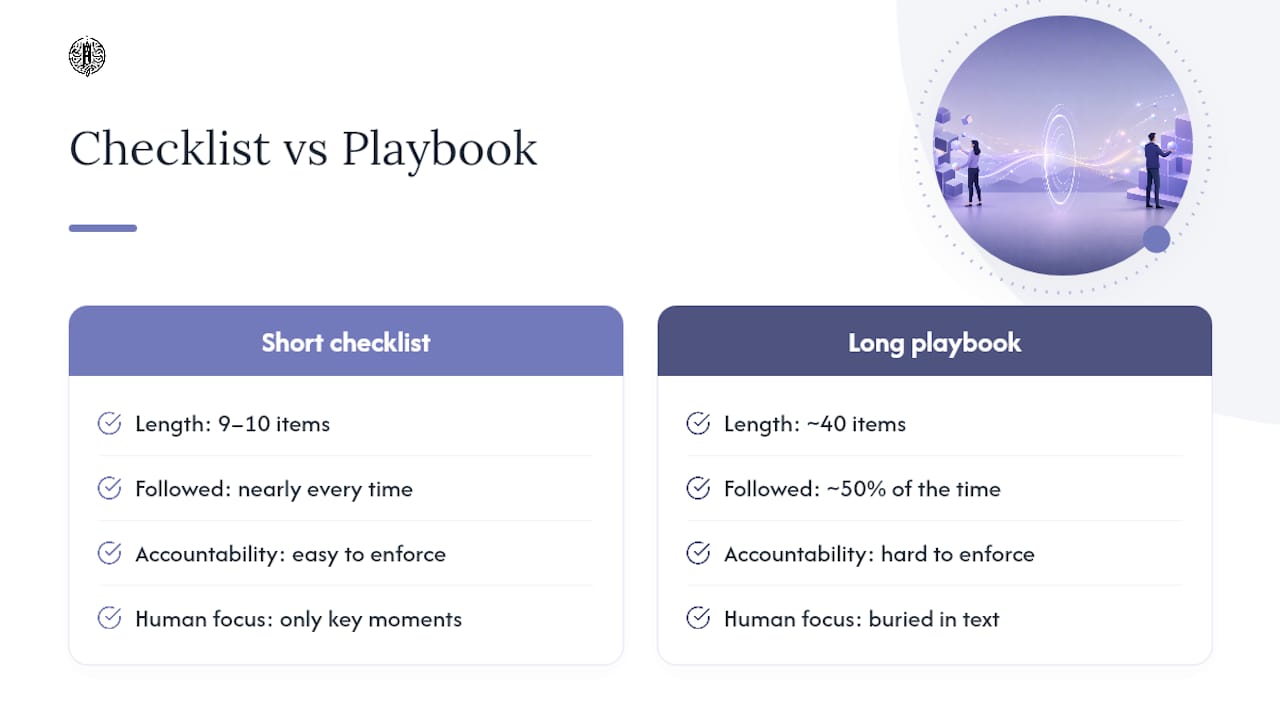
Long onboarding playbooks look thorough and get followed maybe half the time, because nobody reads a forty-item document under deadline pressure. A short, enforced checklist with nine or ten hard requirements gets followed nearly every time, because it’s actually possible to hold someone accountable to it.
The real trade-off isn’t automation versus manual work. It’s deciding which few moments deserve a human and letting software handle everything else. The welcome message and kickoff call earn a person’s attention. Reminder emails and status nudges don’t. Track one number above all others: the time between contract signature and first meaningful delivered value. If that number creeps past fourteen, the checklist has failed, regardless of how professional the process looked internally.
— Jesse Hart
Get Your Onboarding Checklist Running Without the Manual Setup
Some providers offer practical alternatives to building onboarding systems from scratch, including setting up templates, portals, and automations correctly at the start to save time later. Technical advisory work can cover setups like mapping checklists into repeating PM templates, configuring secure client portals, and training teams to maintain processes when key personnel are absent.
Where document volume and handoffs get heavy, the same structured record-keeping pattern behind Project Relay applies directly, giving your onboarding lead one place to track requests, access grants, and kickoff summaries instead of five. If your current onboarding process depends on one person’s memory, visit PROJECT-JTH to talk through what a templated, automated setup would look like for your team, and get a plan for what to fix first.
Sources
Client Onboarding Guide 2026: The Complete Playbook + Free Templates | OnboardMap
The client onboarding checklist every professional services firm needs (free + interactive)
The 6-step client onboarding checklist (with template) - Zapier
FAQ
How Long Should Client Onboarding Take?
Most service firms should target five to fourteen days from signature to first delivered value, with top-performing firms completing the process in five to seven days using a single portal and named document requests.
What Are the Must-Have Steps in a Client Intake Checklist?
At minimum: a signed engagement letter, a completed intake form, collected documents, tested system access, a kickoff call with a same-day or next-day summary, and a go-live readiness check.
Should I Use Email or a Portal for Document Collection?
Use a secure client portal rather than email attachments. A portal creates an audit trail and avoids sensitive files sitting unprotected in an inbox indefinitely.
How Do I Turn a Static Checklist Into a Repeatable Process?
Map every checklist item to a template in your project management tool, automate reminders and status notifications, and keep the welcome message and kickoff call as human touchpoints. Some providers build this kind of implementation, including secure portal setup and team training.
What Causes Most Onboarding Delays?
Drip-style document requests and vague access requests cause the majority of delays. Asking for everything in one structured intake pass, with named files and specific system roles, resolves most of it.
