


Publish a Standard Operating Procedure in One Afternoon for Teams

Start with the process that fails most often or costs the most when it breaks, and write a five-block SOP: purpose, scope and trigger, owner and version, numbered steps, and a review date. Publish it with an ID, an assigned owner, and a next-review date visible at the top. Everything else in a standard operating procedures guide, formatting, testing, review cycles, is secondary to that first document existing at all.
TL;DR:
Most SOP failures occur from unclear ownership or completion criteria, not from formatting issues, making clear responsibility assignment critical.
The simplest, most effective SOPs focus on a unique ID, purpose, scope, roles, step-by-step instructions, QA checks, and revision history, reviewed every 6 to 12 months.
SOPs should be written with one action per step, clear completion criteria, and visuals where applicable, to ensure even the newest team members can follow them.
Testing SOPs with individuals unfamiliar with the process reveals gaps and improves clarity, with review targets set before testing begins.
Assigning a named owner and maintaining a one-page format are far more important to SOP success than formatting or tooling choices.
Projectjth
Bring Clarity to Critical Operations
Projectjth provides technical advisory services and practical communication strategies for teams facing operational challenges under pressure.
Table of Contents
What a Standard Operating Procedures Guide Should Cover First
How PROJECT-JTH Supports SOP Work When You Need Outside Help
What a Standard Operating Procedures Guide Should Cover First
A standard operating procedure is a written instruction that tells a specific person how to complete a specific task the same way every time, with defined inputs, defined outputs, and a name attached to who owns it. That definition matters because most SOP failures trace back to skipping one of those elements, usually ownership or the completion criteria, rather than to bad formatting.
The essential components below apply whether you are documenting a five-minute task or a forty-step production process. Skip one and the document degrades from a procedure into a vague suggestion that nobody trusts enough to follow.
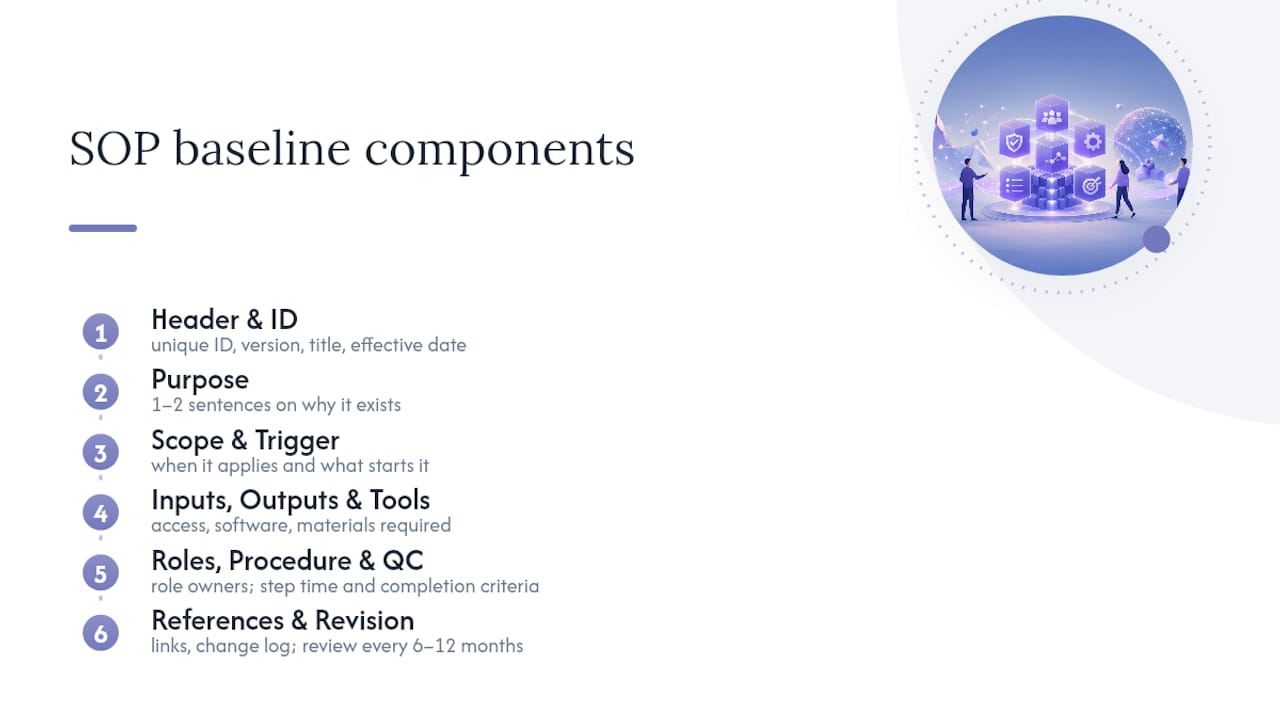
Header and identification. Every SOP needs a unique ID, a version number, a title, and an effective date at the top. Without an ID, teams end up with three files named “onboarding process final v2” scattered across drives, and nobody knows which one is current.
Purpose. One or two sentences on why the procedure exists and what outcome it protects. This is not filler. It tells a new hire why the steps matter, which reduces the chance they will “improve” a step that actually exists for a safety or compliance reason.
Scope and trigger. Define exactly when the SOP applies and what event starts it. A returns’ procedure that does not specify whether it covers damaged goods, wrong items, or both will get misapplied within a month.
Inputs, outputs, and tools. List what the operator needs before starting (access, software, materials) and what should exist when they finish. This section catches the “you need admin rights for step 6” problem before someone hits step 6 and stalls.
Roles and responsibilities. Name the role, not the person, since people change jobs and SOPs should not require a rewrite every time they do.
Step-by-step procedure. Each step gets an owner, an estimated time, and a completion criterion, something observable that confirms the step is actually done.
Quality controls and exceptions. What to check before moving to the next step, and what to do when something goes wrong. This is the section most first drafts leave out entirely.
References and revision history. Links to related SOPs, regulatory standards, or source documents, plus a running log of changes.
The Penn State Extension writing guide lists this same core set, header, purpose, scope, roles, procedure, and revision history, as the baseline for an effective SOP, and recommends reviewing the document every 6 to 12 months regardless of how stable the process seems. For SOPs tied to regulated or technical work, the EPA’s QA/G-6 guidance adds a title page, a table of contents, and a formal QA/QC section, useful structure if your SOP will ever face an audit.
A revision history table doesn’t need to be elaborate to do its job:
That table alone answers the question every auditor and every new hire eventually asks: is this the current version, and what changed since the last one?
Which SOP Format Fits Your Process?
Format choice comes down to two variables: how many steps the process has, and how many decision points it contains. Get those two numbers roughly right and the format almost picks itself.
The Penn State Extension guide frames the decision this way: short, routine tasks with few branches belong in a simple checklist. Long procedures with many steps but few decisions belong in a hierarchical, numbered format. Processes loaded with decision points, if this, then that, belong in a flowchart, because linear text struggles to represent branching logic clearly.
Here’s how that plays out in practice:
Checklist format works for routine tasks like opening/closing procedures, pre-shift equipment checks, or a daily reconciliation. Few decisions, a handful of steps, done.
Linear step-by-step format suits longer procedures that still move in one direction, onboarding a new client, running a monthly close, assembling a product. Ten to thirty steps, minimal branching.
Hierarchical format (main steps with lettered sub-steps) handles complex procedures that still follow one path but need more granularity than a flat list, multi-stage equipment maintenance, for example.
Flowchart format earns its place when the process genuinely branches, triage decisions, escalation paths, troubleshooting guides where the next action depends on what you find.
A common mistake is forcing a decision-heavy process into checklist format because checklists feel simpler to write. The result is a document with parenthetical exceptions crammed into every line (“check the seal, unless it’s a Model 4 unit, in which case skip to step 9”). If you find yourself writing more than one or two conditional clauses per step, switch to a flowchart or split the SOP into separate procedures for each branch. A process that needs both a checklist and a flowchart to describe fully is usually two SOPs pretending to be one.
How Do You Actually Write an SOP This Week?
You don’t need a committee or a software rollout to get your first real SOP published. You need one process, one afternoon of observation, and a testing step most teams skip.
Pick the process using a threshold test. Ask three questions: does more than one person perform this task, does getting it wrong cause real cost or risk, and does the “right way” currently live only in someone’s head? Two yes answers means it belongs at the top of your list.
Capture the actual steps, not the remembered version. Watch the task happen, or better, record it. Screen recording software or a phone camera pointed at a workstation captures the real sequence, including the workarounds nobody mentions out loud. One 7-step SOP framework recommends timing each discrete action during the recording and marking decision points as they occur, which turns a messy video into a near-finished step list before you’ve written a sentence. The tradeoff: video is fast to capture but has to be converted into structured, searchable text before it’s useful to anyone else.
Draft with one action per step. Each line should have one verb, one owner, one completion criterion. “Verify the shipment and update the system” is two steps wearing a trench coat. Split it.
Route it for review. The person doing the work daily reviews for accuracy. A supervisor or quality lead reviews for compliance and clarity. Whoever signs off should have actually read the whole document, not skimmed the header.
Test it with someone who has never done the task. This is the step almost every team skips, and it’s the one that catches real defects. The PMC-published rules for SOP writing put walkthrough testing ahead of approval for exactly this reason: a desk review by someone who already knows the process will miss the gaps that trip up a newcomer.
Publish and train. Post it where the team actually works, not a shared drive nobody opens, and walk through it once as a group before treating it as live.
Pro Tip: Hand your rough draft to the newest person on the team and watch them try to follow it without help. Every place they hesitate, ask a question, or guess is a place your SOP is missing information, not a place they’re missing knowledge.
This capture-to-test cycle typically runs one to two weeks for a moderately complex process, faster if you record the task instead of writing from memory, slower if the process spans multiple departments and needs sign-off from each one.
How Much Detail Belongs in Each Step?
Write every SOP for the newest, least experienced person who will ever use it, not for the expert who already knows the shortcuts. That single rule resolves most detail-level arguments before they start.
Use imperative verbs and short sentences: “Open the valve,” not “The valve should be opened.” Passive voice hides who does the action, and vague verbs like “handle” or “process” leave the reader guessing what physically happens next.
Split any step that contains “and” connecting two distinct actions into two separate steps.
Attach a completion criterion to every step, something the operator can see, count, or measure that confirms the step is done. “Tighten the bolt” is incomplete; “tighten the bolt to 15 foot-pounds” is a step.
Include a time estimate where timing matters for scheduling or quality, not as decoration.
Use a screenshot or short annotated clip when a visual communicates faster than three sentences of description, particularly for software steps involving specific buttons or fields.
Link out to a separate work instruction for anything genuinely technical (calibrating a specific instrument, configuring a specific system) rather than embedding it and bloating the main SOP.
A reasonable ceiling: if a single step needs more than one screen or one printed page to explain, it’s not a step anymore, it’s a sub-procedure that deserves its own SOP with a cross-reference. Long SOPs that try to be everything to everyone are the ones that stop getting read after the second page.
Pro Tip: Read each step out loud to the person who’ll perform it. If they ask “wait, how do I know when that’s done?” you’ve found a missing completion criterion, not a training gap.
Testing and Training That Actually Drive Adoption
An SOP that nobody follows is a filed document, not a procedure. Adoption depends on proving the SOP works before anyone is required to use it, then teaching it in a format that matches how people actually learn on the job.
Run the walkthrough test formally. Hand the draft to someone unfamiliar with the task, watch them execute it step by step, and log every point of confusion, hesitation, or deviation as a defect. Don’t help them unless they’re genuinely stuck; every unprompted question is data.
Set acceptance criteria before you test, not after. Reasonable targets look like: the operator completes the task with an error rate under 1%, or finishes within a defined time window without off-script help. If the walkthrough misses either target, the SOP needs another revision before it’s ready, not the operator.
Fix defects at the source. A missed step usually means a missing completion criterion, not operator error. Revise the specific line, not the whole document.
Train in short, repeatable sessions. A fifteen-minute walkthrough plus a supervised first attempt beats a thirty-minute lecture. People retain procedures they physically practice far better than ones they only hear described.
Embed the SOP where the work happens. A laminated one-page checklist at the workstation, a linked step in your task management tool, or a QR code on equipment gets used. A PDF buried three folders deep does not.
The CISA writing guide makes a point worth repeating here: SOPs customized to the specific team and involving that team in the drafting process see far better adoption than procedures imposed from outside. People follow instructions they helped shape.
How Often Should You Review and Update an SOP?
An SOP is a living document, not a plaque. Treat the review date the same way you’d treat a warranty expiration, something that triggers action, not something that quietly lapses.
Baseline cadence. Review every SOP on a fixed schedule regardless of whether anything obviously changed. A 6 to 12 month cycle works for most operational procedures; compress that to quarterly for anything high-risk, safety-related, or tied to compliance. Guidance on SOP adoption points to the same pattern: procedures with no assigned owner and no fixed review date go stale far faster than ones with both, because nobody notices the drift until something breaks.
Event-driven triggers, changes that force an immediate review regardless of the calendar:
New equipment, software, or a vendor change that alters any step
A near-miss, incident, or audit finding tied to the procedure
Regulatory or policy changes affecting scope or compliance requirements
Repeated operator confusion or deviation flagged during routine work
Staff turnover in a role where the SOP was the only documented knowledge transfer
Assign one owner per SOP, by role, not by name, and give them a standing calendar reminder tied to the review date in the header. Teams managing more than a handful of procedures usually outgrow calendar reminders and move to a shared tracker or a dedicated platform that flags overdue reviews automatically.
Your revision history table should capture, at minimum, the version number, the date, a one-line change summary, and who approved it, the same four fields shown in the earlier example. That log is what turns “we think this is current” into something you can actually prove.
Where to Find SOP Templates and Tools You Can Start With
You don’t need custom software to start. You need a template you’ll actually fill out, and somewhere your team will actually look for it.
Here’s a five-block structure you can paste directly into a blank document today:
Purpose: one sentence on what this procedure accomplishes and why it exists
Scope and trigger: who this applies to and what event starts the procedure
Owner and version: SOP ID, current version, effective date, next review date, owner role
Steps: numbered, one action per line, each with an owner and a completion criterion
Review and changelog: review cadence, last reviewed date, revision history table
That structure, sometimes called a 7-step SOP framework when expanded with drafting and testing phases, scales from a two-person team’s first SOP to a hundred-procedure library without needing a rewrite.
For tools: small teams do fine in Google Docs or Notion, provided the folder structure stays disciplined and every document keeps its ID visible at the top. Screen-recording tools speed up the capture phase dramatically, turning an hour of watching someone work into ten minutes of review. Teams managing dozens of interconnected procedures eventually outgrow shared documents and move to dedicated SOP or knowledge-base platforms with built-in version control and review alerts. Whatever you choose, keep one rule fixed: one searchable source of truth, accessible from a phone on the floor, not just a desktop in an office.
Teams weighing whether to map full workflows or write standalone SOPs sometimes find a comparison of process documentation versus SOP writing useful for deciding which approach fits a given process before committing hours to either.
How This Plays Out in Mission-Critical Environments
The capture, draft, test cycle described above isn’t theoretical. It’s the same sequence that matters most when the cost of an undocumented step is measured in downtime, safety incidents, or a failed audit rather than mild inconvenience.
Applying it to mission-critical work usually means adding two layers most standard SOPs skip:
A living audit trail, not just a procedure document, but a record of who executed it, when, and with what outcome. Pairing an SOP with a structured production record, the approach behind a tool like Project Relay, closes the gap between “we have a written procedure” and “we can prove it was followed.”
Training journals alongside the procedure itself. Documenting the procedure answers what to do; documenting practice over time answers whether the team is actually getting better at it. That’s the same logic behind a training-journal approach like MA Journey, applied to martial arts but transferable to any skill-based operational role.
Customization over copy-paste. A procedure lifted from a template library rarely survives contact with a specific facility’s equipment, staffing, and constraints unchanged. The best SOPs in high-stakes settings get shaped by the people executing them, not handed down intact.
None of this replaces the fundamentals covered above. It just raises the stakes on getting them right the first time.
What Actually Moves the Needle on SOP Quality
If you take one thing from this guide, take this: assign a named owner and keep every SOP to one screen or one printed page. Everything else, format choice, review cadence, tooling, matters less than those two decisions.
Most SOP failures aren’t formatting problems. They’re ownership vacuums. Nobody feels responsible for the document, so nobody notices when it goes stale, and eventually the team stops trusting it and reverts to tribal knowledge, which is exactly the problem the SOP was supposed to fix.
Try this for thirty days: pick one process, write it in five-block format, assign an owner by name, and put a review date thirty days out. Don’t build a library. Prove the model works once before you scale it.
— Jesse
How PROJECT-JTH Supports SOP Work When You Need Outside Help
Writing your first SOP is straightforward with a template and an afternoon. Rebuilding a stale procedure library across a whole operation, especially one where downtime or safety is on the line, is a different scale of problem, and that’s where an outside set of hands often pays for itself faster than another internal push.

Projectjth works with teams in exactly that spot. The advisory side covers risk assessment, security remediation, and infrastructure work where the SOP itself is only half the job, the other half is making sure the procedure survives contact with real Linux systems and real automation pipelines. The leadership training side tackles the harder problem underneath most stale SOPs: teams that can’t communicate clearly under pressure won’t follow a procedure precisely even when it’s well written. And for teams that need a structured way to track production records against the procedures they’re supposed to follow, Project Relay gives you that audit trail without building a system from scratch. If your SOP library needs more than a template and a Tuesday afternoon, visit Projectjth to see where advisory, training, or tooling fits your situation.
Sources
For format rules and baseline review cadence, see the Penn State Extension writing guide. For a concise ten-rule workflow covering drafting through testing, see the PMC-published rules on SOP writing. For technical or regulated SOPs, the EPA’s QA/G-6 guidance sets the standard. For public-safety and interoperability contexts, consult the CISA writing guide.
Ten simple rules on how to write a standard operating procedure
Guidance for Preparing Standard Operating Procedures (EPA QA/G-6)
FAQ
Can I Download SOP Templates in Word?
Yes. The five-block structure covered in this guide (purpose, scope, owner and version, steps, review and changelog) works as a plain Word document; just recreate the headers and keep the layout consistent across every SOP you write.
Is There a Free Tool That Can Create SOPs?
Google Docs and Notion both work as free SOP hosts for small teams, and either one handles the five-block template without needing paid software. Screen-recording tools, many with free tiers, speed up the capture step before you start drafting.
Does Google Docs Have a Built-In SOP Template?
Google Docs doesn’t ship a dedicated SOP template, but its standard document and table tools handle the five-block format easily, and Google Workspace’s template gallery includes general business templates you can adapt.
What Is an SOP for Beginners?
An SOP is a written set of instructions that tells someone exactly how to complete a specific task, including who owns each step and how to confirm it’s done correctly. Beginners should start with one high-frequency process, use a simple checklist or linear format, and test the draft with someone unfamiliar with the task before publishing it.
