


7-Category System Hardening Checklist for IT Ops, Measured and Mapped

System hardening means systematically closing every configuration gap an attacker could exploit, from default passwords to unpatched services. The one indispensable first step is picking a published benchmark, CIS or a relevant DISA STIG, and mapping your current build against it to produce a documented baseline. Success looks like a baseline you can audit repeatedly and reproduce on demand, not a one-time cleanup.
TL;DR:
Regularly prioritize fixing the highest-exploitability gaps first, such as default accounts, exposed ports, and weak configurations, before less critical issues.
Automate enforcement and continuous scanning using tools like SCAP, Ansible, or Terraform to prevent configuration drift over time.
Document all exceptions with clear owners and expiry dates to prevent unmanaged deviations from the baseline.
Focus on profiling and tailoring benchmarks like CIS or DISA STIGs to your environment, rather than blindly applying generic checklists.
Maintain the baseline as a living program with ongoing scans, updates, and validation, not as a one-time configuration task.
PROJECT-JTH
Bring Clarity to Security Decisions
PROJECT-JTH provides technical advisory services and risk assessments for organizations facing operational and cybersecurity challenges.
Table of Contents
The Complete System Hardening Checklist by Category
A system hardening checklist only earns its name if it is organized by attack surface, not by whatever task happens to be top of mind. Group the work into seven categories, and treat each as a discrete audit domain with its own owner and review cadence.
1. User accounts and privileged access. Remove or disable default and vendor accounts immediately after provisioning. Enforce least privilege so no service account or human user holds standing admin rights they don’t actively need, and require multi-factor authentication on every privileged login. Review account lists quarterly at minimum, since dormant accounts from departed contractors are one of the most common findings in internal audits.
2. Patch management. Build a real inventory of installed software and firmware before you touch a patch schedule. Prioritize by exploitability rather than by vendor severity label alone, and stagger patch windows so critical servers get a controlled rollout with a documented rollback plan.
3. Network configuration and firewall rules. Close every port that isn’t actively serving a business function. Segment networks so a compromised workstation can’t reach your domain controllers or database tier directly, and layer a host-based firewall on top of your network firewall rather than relying on perimeter controls alone.
4. Services and application configuration. Disable services you didn’t explicitly choose to run. Lock down administrative interfaces to specific management networks, and strip default configuration files that ship with sample credentials or verbose error output.
5. Logging and monitoring. Centralize logs off the host that generated them, since local logs are the first thing an intruder deletes. Enable file integrity monitoring on critical binaries and configuration paths, and tune alerts so your team responds to real signal instead of drowning in noise.
6. Physical and boot security. Password-protect BIOS/UEFI settings, enable Secure Boot, and apply full-disk encryption on any device that could physically leave your control.
7. Cloud configuration controls. Lock down security groups to the narrowest rule set the application needs. Apply IAM least privilege the same way you’d apply it to a Linux user account, and monitor for configuration drift the same way you’d monitor for a failed patch.
This structure lines up with the audit categories in commercially produced checklists like Cimcor’s system hardening guide, which also stresses documenting any approved exception through formal change control rather than letting it live in someone’s memory.
Inventory every account, service, and open port before changing anything.
Fix the highest-exploitability gaps first, not the easiest ones.
Log every exception with a reviewer name and an expiration date.
Pro Tip: Run your first hardening pass against a snapshot or staging clone, not production. The number of “temporary” service accounts and forgotten cron jobs you’ll find on a live server is almost always higher than teams expect.
What Does a Windows Hardening Checklist Look Like?
Windows hardening centers on Active Directory hygiene and Group Policy enforcement, since most Windows compromises trace back to over-permissioned accounts or unmanaged remote access.
Audit privileged AD groups and remove standing local admin rights from standard users wherever the business allows it.
Apply Microsoft’s or CIS’s Windows baselines through Group Policy Objects or an automated configuration tool, rather than hand-tuning each machine.
Configure Windows Update for staged rollout with a documented emergency patch path for actively exploited vulnerabilities.
Enable BitLocker on every drive holding sensitive data and enforce Secure Boot at the firmware level.
Restrict RDP to a jump host or VPN, disable it entirely where remote access isn’t needed, and require MFA on any remote management session.
Forward Windows Event Logs to a central collector, deploy Sysmon for process-level visibility, and set log retention long enough to support a real incident investigation, not just a compliance checkbox.
Pro Tip: Sysmon configuration files are not one-size-fits-all. A default Sysmon config generates enough noise to bury real alerts within days; start from a maintained community config and tune it down, not up.
What Does a Linux Hardening Checklist Look Like?
Linux hardening starts before the first login, with the install image itself. A minimal install with only the packages the workload actually requires eliminates a large share of the attack surface before you write a single firewall rule.
Remove unused packages, services, and default accounts immediately after provisioning.
Harden SSH: disable root login, enforce key-based authentication over passwords, restrict which users can connect, and monitor auth logs for brute-force patterns.
Enforce SELinux or AppArmor in enforcing mode rather than permissive, and treat policy denials as investigation triggers, not noise to suppress.
Tune kernel parameters through sysctl for network hardening (disabling IP forwarding where unneeded, restricting ICMP redirects) and apply a host firewall like UFW, firewalld, or nftables on top of it.
On cloud infrastructure, run a two-firewall approach: cloud security groups paired with a host-level firewall so a misconfigured security group doesn’t leave the host fully exposed.
On container hosts, scan images before deployment, run containers with the least privilege the workload allows, and enforce runtime policy rather than trusting the image alone.
Distribution-specific tooling matters here. Canonical’s Ubuntu Security Guide automates CIS profile application directly, while Red Hat ships system-wide cryptographic policies and SCAP-based compliance scanning built into RHEL itself.
Pro Tip: If you inherit a fleet of Linux hosts with no documented history, run an SSH configuration audit first. Legacy password auth left enabled “just in case” is one of the most common findings on servers that predate the current admin team.
How Do You Turn a Checklist Into an Ongoing Program?
A checklist run once is a snapshot; a hardening program is a cycle. The gap between the two is exactly where most organizations lose ground, because the baseline they built at deployment quietly drifts as patches, one-off fixes, and new services accumulate.
Publish a formal baseline mapped explicitly to CIS, a DISA STIG, or NIST guidance, and embed it directly into your build pipeline so new servers inherit it automatically rather than being hardened after the fact.
Enforce configuration through code. Tools like Terraform and Ansible let you define the hardened state as version-controlled infrastructure, so a config change becomes a reviewable pull request instead of a manual SSH session nobody documents.
Schedule continuous compliance scans using OpenSCAP or another SCAP-based tool, and route findings directly into your incident response and patch playbooks rather than into a report nobody reads.
Document every exception through change management, with an owner, a business justification, and an expiration date. Undocumented exceptions are how a “temporarily open” port becomes permanently open.
Track drift and remediation metrics. Baseline coverage percentage, drift rate between scans, and average time-to-remediate tell you whether the program is actually working, not just whether it exists on paper.
Treating hardening as a continuous lifecycle rather than a one-time project is the single biggest operational shift most teams need to make. A baseline enforced once and never rescanned degrades within months as patches land, services get added, and well-meaning admins make “temporary” changes that never get reverted.
Which Benchmarks and Tools Actually Make This Measurable?
CIS, DISA STIGs, and NIST cover overlapping but distinct ground, and picking the wrong one for your context wastes effort. CIS benchmarks give you prescriptive, vendor-neutral configuration recommendations suited to most commercial environments. DISA STIGs map more tightly to government and defense-contractor compliance requirements, with stricter defaults than CIS in several areas. NIST maintains security configuration checklists and machine-readable profiles built for automated scanning rather than manual review.
Framework | Best fit | Automation support |
|---|---|---|
CIS Benchmarks | Commercial enterprises, general baselines | SCAP content, vendor USG tooling |
DISA STIGs | Government, defense, regulated contractors | STIG Viewer, SCAP content |
NIST checklists | Automated compliance pipelines | Machine-readable profiles |
Use OpenSCAP or the Ubuntu Security Guide to apply and verify CIS profiles on Linux fleets.
Use RHEL’s built-in SCAP tooling where the distribution is Red Hat Enterprise Linux specifically.
Integrate scan results into CI/CD so a non-compliant build fails the pipeline instead of reaching production.
When guidance conflicts between a vendor and a benchmark, authoritative frameworks recommend defaulting to whichever setting is more restrictive.
How PROJECT-JTH Applies This Checklist in Practice
Jesse Hart has spent years translating dense technical remediation work into steps operations teams can actually execute under pressure. In practice, PROJECT-JTH treats baselines as living artifacts: automate what you can enforce, document every exception with a timebox, and prioritize the fixes that reduce real exploitability over the ones that simply look tidy on a spreadsheet.
Why Risk Assessment Has to Come Before Hardening
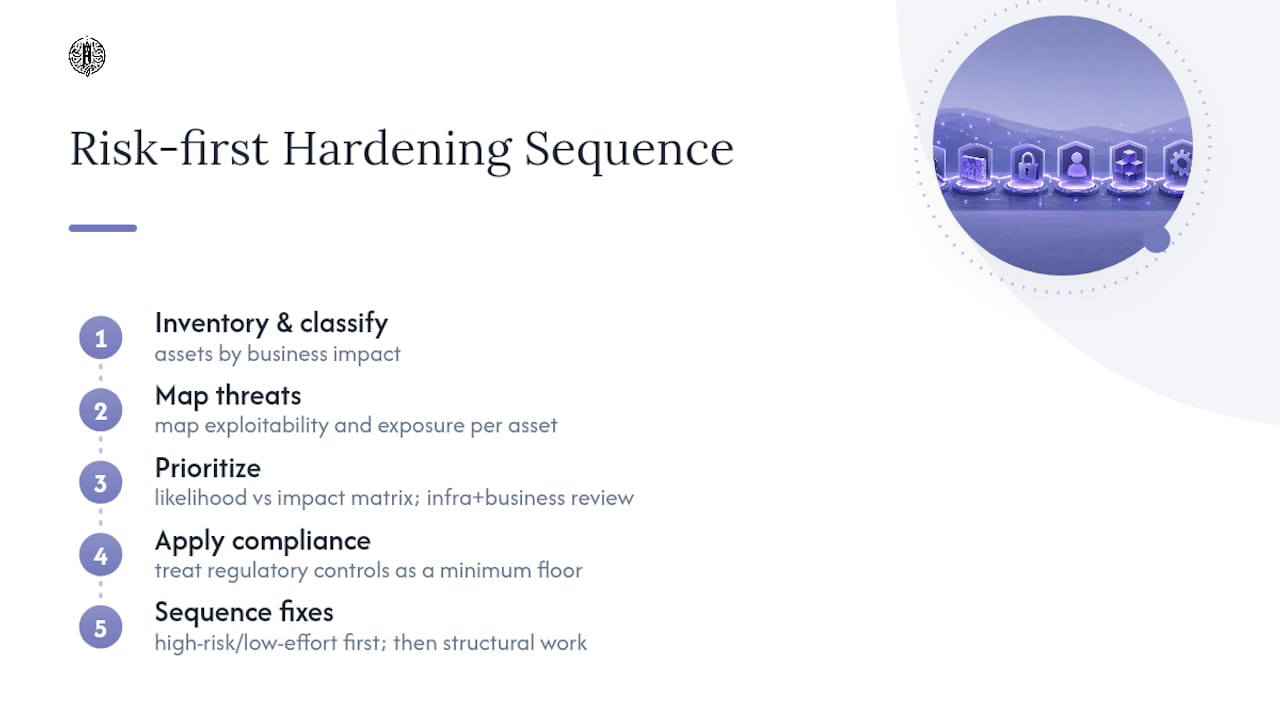
Hardening without prioritization wastes effort on low-value fixes while real exposure sits unaddressed. Before you touch a single configuration, inventory what you’re protecting and what actually threatens it.
Start by classifying assets by business impact: a customer database and an internal wiki do not deserve the same hardening intensity or the same review cadence. Map known threats against each asset class, weighing exploitability and exposure over theoretical severity. A vulnerability with a high severity score but no network path to it deserves lower priority than a moderate one sitting on an internet-facing service.
Prioritization frameworks don’t need to be elaborate to work. A simple matrix scoring likelihood against impact, reviewed by someone who understands both the infrastructure and the business context, beats a purely severity-driven patch queue almost every time. Compliance requirements add another layer: a system in scope for a regulatory framework may need controls that exceed what pure risk scoring would suggest, so treat compliance-mandated items as a floor, not a ceiling.
Resource constraints are real, and pretending otherwise leads to checklists that never get finished. Sequence hardening work in phases: close the highest-risk, lowest-effort gaps first (default credentials, exposed management ports), then move into structural work like network segmentation and centralized logging that takes longer to implement but pays off over the system’s entire life. Skipping this step and jumping straight to a generic checklist is how teams spend weeks hardening a low-value system while a crown-jewel database sits with default configurations untouched.
Why Backups Still Matter After You’ve Hardened Everything
Hardening reduces the odds of compromise; it does not eliminate them, and a hardened system with no recovery path is still a single point of failure. Ransomware operators specifically target backup infrastructure once they’ve gained a foothold, so your backup strategy has to assume the primary environment is compromised, not just offline.
Isolate backups from the production domain, whether through air-gapped storage, immutable snapshots, or a separate credential set that a compromised production account can’t reach. If your backup service account uses the same domain credentials as everything else, an attacker who owns the domain owns your backups too.

Test restores on a defined schedule, not just backup jobs. A backup that has never been restored is an assumption, not a control, and plenty of organizations discover their backup was silently failing only after they needed it. Document recovery time objectives per system tier so the team knows which servers get restored first during an actual incident, and factor hardened-configuration recovery into the plan itself: restoring a server to its pre-hardening state defeats the purpose if your backup image predates the baseline. Keep hardened gold images or configuration-as-code definitions alongside data backups so a rebuild restores both the data and the security posture in one pass.
Common Mistakes That Undermine a Hardening Effort
The most damaging mistake is treating hardening as a one-time project instead of a maintained state. A baseline applied once at deployment and never rescanned drifts within weeks as patches, new services, and manual fixes accumulate, and most organizations only discover the drift during an audit or, worse, an incident.
Over-hardening without testing is nearly as common. Disabling a service or locking down a port that turns out to support a business-critical function creates an outage, and outages during a hardening rollout erode the organizational appetite to keep hardening at all. Always validate changes in staging before pushing to production, even when the change looks obviously safe.
Copying a checklist without adapting it to the environment is another recurring failure. A CIS benchmark written for a general enterprise server doesn’t account for the specific application dependencies running on your box, and applying it verbatim can break functionality the benchmark’s authors never anticipated. Adapt the benchmark; don’t just apply it.
Undocumented exceptions quietly erode a baseline until nobody remembers why a given port is open or a given account has standing admin rights. Every exception needs an owner, a reason, and an expiration date, or it becomes permanent by default.
Finally, teams frequently harden the operating system while ignoring the application layer running on top of it, or harden servers while leaving workstations and cloud configurations untouched. A hardening effort is only as strong as its least-hardened component, and attackers consistently go looking for exactly that gap.
What Actually Determines Whether a Hardening Program Works
Most hardening advice stops at the checklist, and that’s precisely where it falls short. A list of configuration items is necessary but not sufficient: the organizations that actually stay hardened are the ones that treat the checklist as day zero of a maintenance cycle, not the finish line.
The conventional wisdom overweights breadth and underweights verification. Plenty of teams can produce an impressive-looking checklist mapped to CIS or a STIG profile, then never rescan against it again. Configuration drift is not a hypothetical risk; it is the default outcome of normal operations, patches, new hires, and one-off fixes made under deadline pressure.
What the reader should prioritize first is not completeness, it’s repeatability. A narrower baseline you can scan, enforce, and remediate on a defined cadence beats an exhaustive checklist applied once and forgotten. Automation and drift detection aren’t optional add-ons to hardening; they’re the mechanism that keeps a hardening effort from decaying back into the exact posture it started from.
— Jesse Hart
Get Help Turning This Checklist Into an Operating Baseline
Some teams want the checklist enforced continuously, not audited once and forgotten. Technical advisory work can focus on that gap: building baselines mapped to industry benchmarks, wiring them into automation and configuration management, and keeping remediation moving instead of stalling after the first pass.
An initial engagement typically starts with an assessment of your current configuration against a chosen benchmark, moves into prioritized remediation of the highest-risk findings, and ends with automation rollout so the baseline holds without manual policing. If your hardening effort stalled somewhere between the checklist and the ongoing program, reach out to PROJECT-JTH to scope an assessment.
Primary Standards Worth Bookmarking
For validating or extending this checklist, go straight to the source material:
CIS Benchmarks: prescriptive, vendor-neutral configuration recommendations for most platforms.
DISA STIGs and NIST checklists: government-mapped profiles built for compliance and automated scanning.
OpenSCAP, Ubuntu Security Guide, and RHEL SCAP tooling: automation for applying and verifying benchmark profiles.
Sources
FAQ
What is the best hardening checklist to follow?
There’s no single “best” checklist; the strongest approach maps your organization’s systems to a recognized benchmark like CIS or a relevant DISA STIG and adapts it to your actual environment rather than applying it verbatim.
What is a system hardening checklist?
It’s a structured set of configuration checks, covering accounts, network exposure, patching, services, logging, and physical security, used to reduce a system’s attack surface and create an auditable security baseline.
What are the recommended guidelines for system hardening?
Authoritative guidance recommends removing unnecessary services, enforcing secure defaults, and choosing the most restrictive setting whenever vendor and benchmark recommendations conflict, then maintaining that baseline through continuous scanning.
What steps should be included in a server hardening checklist?
At minimum: account and privileged access review, patch management with rollback plans, network and firewall segmentation, service and application configuration audits, centralized logging, and physical or boot-level protections like full-disk encryption. Client engagements often use a similar category breakdown, adapted to each environment’s benchmark and risk profile.
How often should a hardened baseline be rescanned?
There’s no universal fixed interval, but continuous or at least monthly compliance scanning against your published baseline catches configuration drift long before it becomes an audit finding or an incident.
