


Teach One Behavior in 5 Minutes: Training Video Production for L&D

Build every module around one observable behavior, then choose the format that teaches it with the least friction and cost. Screen recording handles software steps; live-action scenarios handle judgment calls; animation handles what a camera cannot show. Pick the format, cap the runtime near five minutes, and schedule a real test-learner review before anyone calls the project finished.
TL;DR:
Using modular recording and a hub-and-spoke model can significantly reduce costs and streamline updates across large training libraries.
A five-minute training video generally takes 1 to 2 weeks to produce for simple formats, but complex scenario videos may require 3 to 6 weeks.
Conducting a real test-learner run is essential to verify that the content effectively teaches the behavior and is understandable across target audiences.
Publishing compliance-critical content through an LMS with SCORM or xAPI enables accurate tracking of completion and operational impact.
Costs vary mainly with format complexity, talent involvement, and localization needs, with scenario-based videos being the most expensive option.
PROJECT-JTH
Bring More Clarity Under Pressure
PROJECT-JTH combines technical advisory services, leadership training, and software solutions for teams facing operational challenges.
Table of Contents
What Is Training Video Production, and Which Format Fits Your Objective?
How Do You Actually Produce a Training Video Start to Finish?
What Does Training Video Production Cost, and How Long Does It Take?
Where Should You Publish a Training Video, and What Should You Measure?
How PROJECT-JTH Applies This Playbook to Mission-Critical Teams
What Is Training Video Production, and Which Format Fits Your Objective?
Training video production is the scripted, filmed, and edited creation of instructional content for a workforce, distinct from courses that teach someone how to operate a camera. The discipline succeeds or fails on one decision made before a single frame is shot: what format matches the behavior you need someone to perform afterward.
Five formats cover nearly every corporate, safety, or compliance need, and each one maps to a distinct cost and complexity tier, according to a 2026 guide on corporate training video production.
Screen recording: Best for software walkthroughs and system navigation. Cost tier is lowest, often produced in-house.
Instructor-to-camera: Best for policy explanation, onboarding, and leadership messaging. Cost tier is low to moderate.
Scenario or role-play: Best for judgment calls, customer interactions, and safety incidents that require realism. Cost tier is high due to talent, locations, and multiple takes.
Animation or motion graphics: Best for abstract concepts, internal mechanics, or anything unsafe to film live. Cost tier is moderate to high depending on style complexity.
Microlearning: Best for single-fact reinforcement or app-based refreshers. Cost tier is low per unit but adds up across a large library.
Decide format using four filters: how often the content changes, whether realism actually improves comprehension, whether the audience spans multiple languages, and whether captions or audio description are required. Content that changes quarterly should never be shot live-action; that’s a budget mistake teams make once and remember forever.
How Do You Actually Produce a Training Video Start to Finish?
Production runs in five sequenced phases, and skipping the first one is the single most common reason training videos underperform.
Lock the behavior and source document. Write one sentence: “After watching, the learner will be able to [specific action].” Attach the approved SOP, safety standard, or policy document the video will represent, since production without a locked source is what leads to reshoots.
Draft the script with an SME, not around one. A subject-matter expert supplies accuracy; a writer or producer supplies pacing. Narration should run tight and declarative, chunked into 15 to 30 second beats that match one visible action each. Build in caption text from the first draft, not as an afterthought.
Storyboard scene by scene. Map every line of narration to the exact visual evidence that proves it: a cursor click, a hand movement, a warning label. If a sentence has no corresponding visual, cut the sentence or add the shot.
Record with format-specific discipline. Screen capture at native resolution with cursor highlighting on; treat audio as the priority track, since viewers forgive rough video before they forgive muddy sound. For talking-head segments, use natural window light or a simple three-point kit, and shoot cutaways or B-roll of the actual task separately so editors have coverage.
Edit for clarity, not polish. Prioritize burned-in captions, on-screen step labels, and pacing that lets each action finish on screen before narration moves forward. Request deliverables in MP4 with a separate caption file (SRT or VTT) and the original project file, not just the export.
Pro Tip: Use a teleprompter app on a tablet for on-camera talent, even for a two-minute segment. Reading verbatim from an approved script prevents SMEs from improvising steps that contradict the actual SOP.
What Does Training Video Production Cost, and How Long Does It Take?
Five factors drive the invoice for professional video production more than anything else: format, total finished minutes, whether paid talent or actors are involved, animation complexity, and how often the content needs localization or updates. A five-minute animated module with voiceover in three languages costs multiples of a five-minute screen recording narrated once. Scenario-based videos carry the highest cost tier because they require casting, locations, and multiple camera setups, according to the step-by-step production guide from Knowlify.
Three tactics reliably cut spend without cutting quality:
Shoot modularly. Record narration and B-roll in reusable segments so a policy update only requires re-cutting one scene, not a full reshoot.
Adopt a hub-and-spoke model. Produce a small number of high-quality “hub” assets centrally, then let local teams handle quick “spoke” updates in-house, a structure that scales cost efficiently as a library grows.
Write for longevity. Keep scripts focused on the behavior itself rather than tool-specific details that expire with the next software update.
Timelines vary just as widely: a simple screencast can turn around in days, an instructor-to-camera module runs 1 to 2 weeks from script to delivery, and a scenario or role-play shoot typically needs 3 to 6 weeks once casting and locations enter the schedule.
How Do You Know a Training Video Is Ready to Publish?
A training video is ready when it passes three gates: subject-matter accuracy, accessibility compliance, and one real test-learner run. Skipping the third gate is where most otherwise-solid videos quietly fail.
The test-learner step matters because SMEs suffer from what researchers call the curse of knowledge: once someone knows a procedure well, they forget which steps are actually non-obvious to a newcomer. Pick a tester who genuinely represents the target audience, not a colleague who already knows the material, and record their time-to-complete, where they paused or looked confused, and any knowledge-check question they missed.
Before that test run, confirm the basics:
Captions match narration verbatim, including numbers and product names.
On-screen labels and text are legible at mobile resolution, not just on a laptop.
Audio description is scripted in wherever a visual cue carries meaning no narration states aloud.
Final acceptance requires the objective to be demonstrably taught, a quiz or knowledge check with a defined pass threshold, confirmed playback across the devices your workforce actually uses, and a signed sign-off naming the record owner.
Pro Tip: Ask your test learner to explain the procedure back to you in their own words immediately after watching. If they can’t restate the one behavior the video targeted, the script needs another pass, not just a caption fix.
Where Should You Publish a Training Video, and What Should You Measure?
Route compliance-critical and certification-tracked content through an LMS using SCORM or xAPI so completion data ties back to individual training records. Reserve a shared embed or internal knowledge base for reference material where formal tracking matters less than fast access.
Whichever route you choose, measure at minimum: completion rate, a short comprehension quiz score, time-on-task compared against the video’s runtime, and one downstream operational metric the training was meant to move, such as incident rate or error frequency.
Version control protects the library long after launch:
Name a record owner responsible for the asset’s accuracy.
Define update triggers in advance: a policy revision, an equipment change, a new regulation.
Retain source project files, not just the final export, so updates don’t require a full reshoot.
A tool like Project Relay can hold that ownership and update-trigger data alongside the production record itself, which keeps a training library from drifting out of sync with the SOPs it represents.
How PROJECT-JTH Applies This Playbook to Mission-Critical Teams
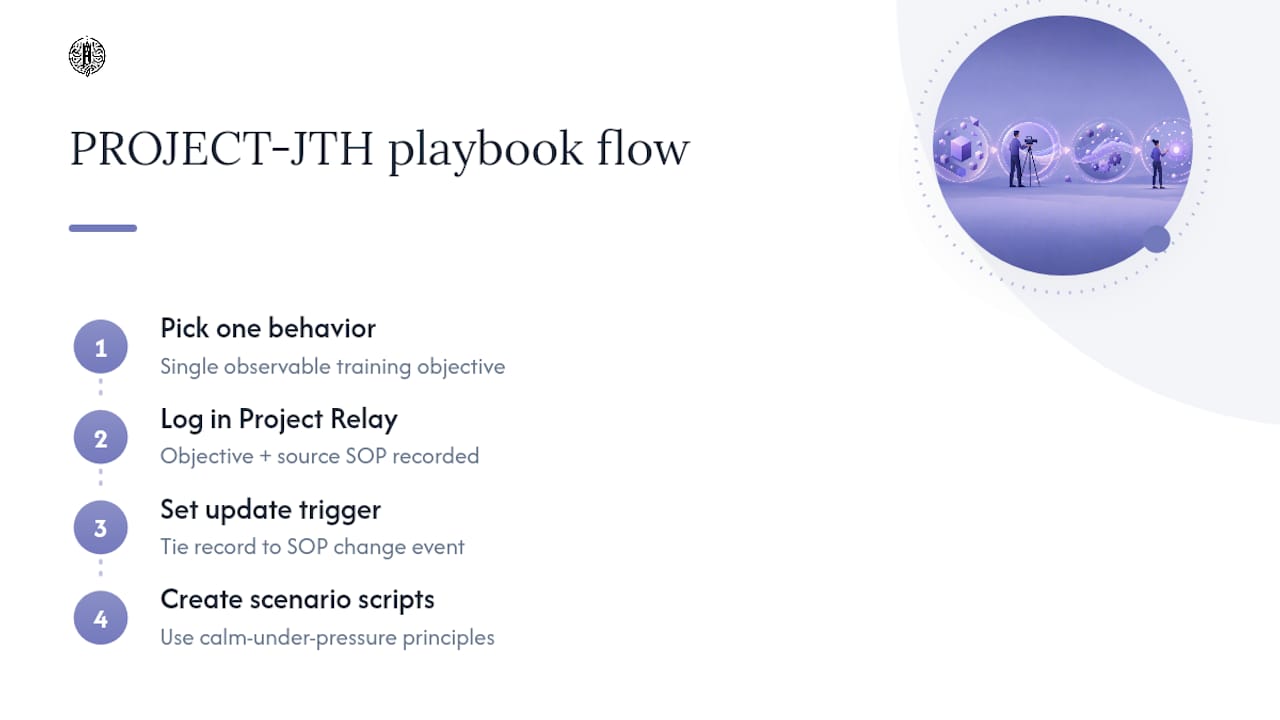
PROJECT-JTH builds every training brief around one observable behavior before discussing format or budget, then logs that objective, its source SOP, and its update trigger inside Project Relay so the record never outlives the procedure it teaches. That discipline matters most in mission-critical environments, where a stale safety video is worse than no video at all.
The company’s leadership training work, delivered through keynotes and workshops on calm communication under pressure, feeds directly into scenario-based scripts: the same principles that keep a team composed during an incident shape how that incident gets rehearsed on screen.
— Jesse Hart
Get a Scoped Quote for Your Next Training Video
It is better to avoid guessing at a vendor quote blind: instead of describing your project in vague terms and hoping the bid matches your intent, bring a locked learning objective and get pricing scoped to the actual format and runtime you need.
A creative production division can handle scripting, filming, and editing for corporate and safety training video production, alongside leadership workshops for teams working under pressure, and provide tools for tracking production records and update triggers your library needs long after launch. To prepare a scoped quote, gather your one-sentence learning objective, a sample SOP or source document, your target audience, and the delivery platform (LMS or embed) you plan to publish to. Visit PROJECT-JTH to request a consultation or upload a brief directly.
Sources
For deeper detail on formats and cost tiers, see the corporate training video guide and the step-by-step production walkthrough. For scaling a library across multiple teams, review the hub-and-spoke framework. On why visual content moves audiences, see this breakdown on visual content’s impact. For record-keeping standards, see the 2026 production guide from X-Pilot.
FAQ
What Is the Ideal Length for a Training Video Module?
Most effective modules run 2 to 6 minutes, with screen recordings and microlearning on the shorter end and scenario-based videos running longer to accommodate realistic pacing.
Who Should Write the Script for a Safety Training Video?
A writer or producer should draft the script in direct collaboration with a subject-matter expert, since SMEs supply accuracy but often miss steps that feel obvious to them and confusing to a new learner.
What Is a Test Learner, and Why Is It Mandatory?
A test learner is a representative member of the target audience who reviews the finished video before publishing so producers can catch gaps caused by the curse of knowledge, where SMEs unconsciously skip steps they consider obvious.
How Much Does Corporate Training Video Production Typically Cost?
Cost depends on format, total runtime, talent needs, animation complexity, and localization; screen recordings sit at the low end while live-action scenario videos with paid actors sit at the high end of the range.
