Help Where You Need It
Tap the ⓘ explanations on major cards to learn what a metric means and how to interpret it in context.

BY PROJECT-JTH LLC
FitInsightsTurn Apple Health data into clear readiness, training load, and recovery insight, with on-device analysis and explanations that show how the numbers are built.
iOS Only · iPhone + Apple Watch Companion
7-day full-access preview. Premium required afterward.
Wellness and training insight. Not medical advice.
From Tracking to Understanding
You already collect sleep, heart rate, workouts, and movement. The harder question is what they mean together.
FitInsights helps you connect how you started the day, what you have done, and the patterns developing over time. Use that context to make a more informed training decision and learn something about your own baseline along the way.
Education First
A useful number should come with a clear question, visible inputs, and an explanation of its limits.
Tap the ⓘ explanations on major cards to learn what a metric means and how to interpret it in context.
Settings → Documentation explains the signals, formulas, and scientific framing behind the app’s estimates.
Personal baselines and converging signals provide context. FitInsights does not assign a biological age or an “aging progress” score.
Four Useful Perspectives
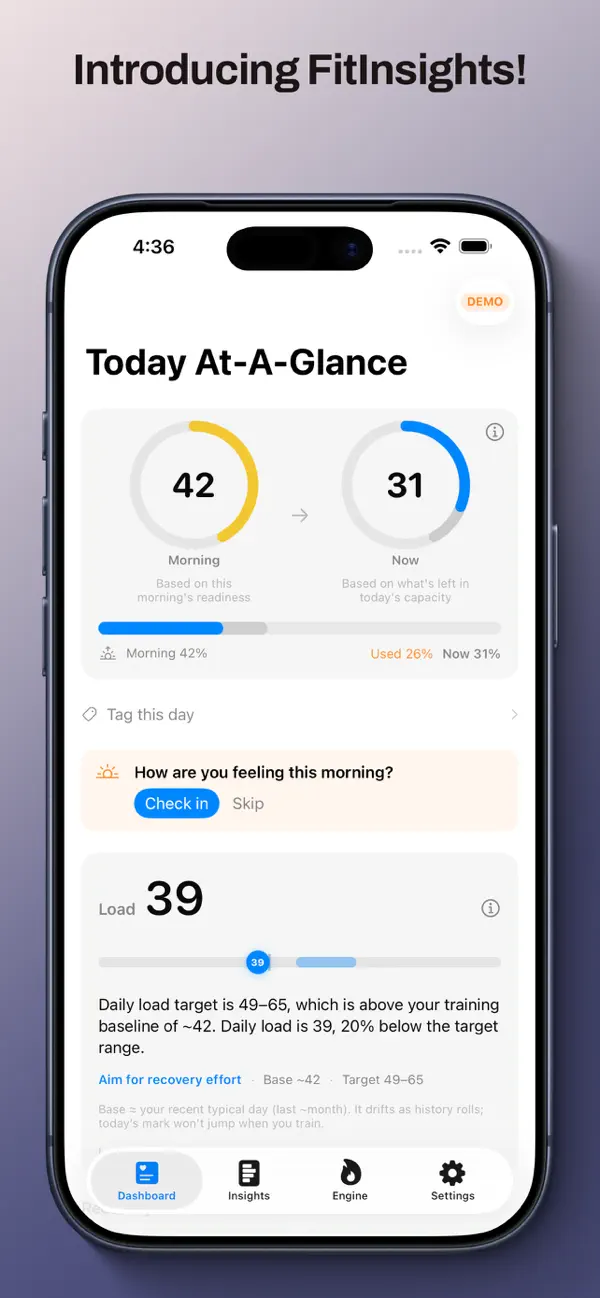
Your overnight starting point draws on sleep, heart-rate variability, resting heart rate, and prior load. It settles after a short wake-relative grace period, then stays stable for the day.
A live estimate that responds to workouts and everyday movement through the day. Walking and errands can use capacity even when you have not logged another workout.
See today’s demand against a recovery-informed target and your recent training base. A target reflects today’s context; your base reflects what has been usual for you.
A session-focused snapshot of remaining capacity after workouts completed through that session’s end. It gives the workout a lasting reference point rather than a live full-day reading.
Now includes everyday movement. After Training focuses on workout load through a particular session and uses a different capacity reference. Load and remaining capacity also count movement differently. Each answers a different question; the in-app explanations make those distinctions visible.
Inside FitInsights
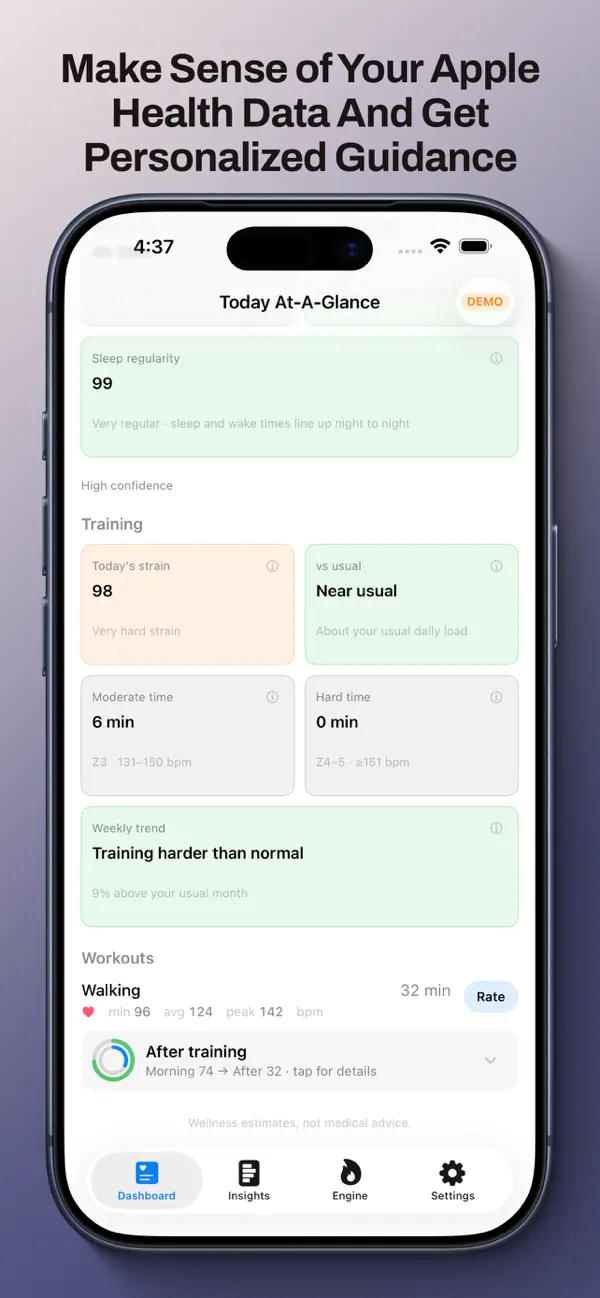
Start with a morning briefing, capacity timeline, and Load versus target and base. Review recovery signals, workouts, and after-training effort; add optional effort or feel check-ins.
Explore training mix and zones, load and recovery trends, sleep, wellness, body and VO₂ trends, and a metric library. Look beyond a single unusual day.
Bring activity rings, VO₂ context, heart-rate recovery, and aerobic efficiency into view, with weekly actions and optional fitness checks.
Check Today and Morning, Now, and Load complications from your wrist. The companion uses Health data for convenient context between visits to the full dashboard.
Settings → Documentation
Short explanations help in the moment. The full in-app guide gives you the longer story.
Explore the scientific and methodological basis for the estimates, including how sleep is attributed, how Morning is anchored to waking, and how training targets and recovery signals are interpreted.
InputsUnderstand the role of sleep, HRV, resting heart rate, workouts, and movement.
MethodsRead about the calculations and personal baselines behind the displayed numbers.
InterpretationLearn why values update, why some stay stable, and why two views can disagree.
LimitsKeep data quality and uncertainty in view. A documented estimate remains an estimate.
A More Informed Choice
FitInsights is designed for people who want to understand the reasoning behind a recommendation.
| When an App Gives You… | FitInsights Gives You… |
|---|---|
| A score without a clear question | Morning, Now, Load, and After Training each have a defined purpose. |
| A calculation you cannot examine | Per-metric explanations and a full guide describe inputs and methods. |
| Changing numbers without context | Separate live readings from starting points and session snapshots. |
| An “aging progress” claim | Focus on Apple Health signals, personal baselines, and training patterns. |
| Server-dependent scoring | Health data analysis and scoring run on-device. |
A strong fit for Apple Health users, endurance and hybrid trainers, martial artists, and anyone who wants the “why” alongside the number.
On-Device by Design
FitInsights reads Apple Health and calculates readiness and training insight on your device.
Optional iCloud syncing supports preferences and ratings. Local scoring does not mean that every optional sync feature is disabled.
One Shared Methodology
The FitInsights Engine brings a consistent capacity language to related PROJECT-JTH apps. FitInsights is the full dashboard for exploring that context.
Explore live Now, Load, history, Insights, Fitness, and the documentation behind the numbers.
The martial arts journal can show Morning and After Training capacity in session detail, with “Powered by the FitInsights Engine” attribution.
Groundwork: Breathe & Move combines breath work, short calisthenics sessions, and logging with capacity context from the same engine.
MA Journey and Groundwork work without FitInsights installed. Shared methodology does not mean a shared subscription or a single account.
Try the Full App
Full access begins with a 7-day preview from first launch. After the preview, Premium is required to continue using the full app.
Full access with a monthly subscription.
Auto-renewing subscription.
Full access with an annual subscription.
Auto-renewing subscription.
Unlock Premium with a one-time purchase.
No recurring subscription charge for this unlock.

iOS Only · iPhone + Apple Watch Companion
Prices shown in USD. Confirm local pricing and purchase terms in the App Store. Optional tips support development and do not unlock Premium.
Questions, Answered
FitInsights is an iOS app for readiness, training load, and recovery insight from Apple Health. It combines a daily view, longer-term trends, and explanations of the inputs and methods.
No. FitInsights is iOS only, with an Apple Watch companion.
Apple Watch is recommended, but not required. FitInsights needs relevant Apple Health data; the available insight depends on the signals and history you provide access to.
Education and transparency are core features. Tap per-metric information sheets for the short explanation, or open Settings → Documentation for formulas, interpretation, and scientific framing. FitInsights does not offer biological-age or aging-progress scores.
Morning is the overnight starting point. Now tracks remaining capacity as the day unfolds. After Training is a workout-focused snapshot through a session’s end. Different movement inputs and capacity references mean they are not interchangeable.
No cloud processing is needed for scoring. HealthKit analysis runs on-device. Optional iCloud syncing can support preferences and ratings; the privacy policy explains the broader data practices.
The 7-day full-access preview starts at first launch. After it ends, choose monthly, yearly, or lifetime Premium to continue. Optional Tip Jar purchases do not grant Premium.
No. Each app works independently. Where they show FitInsights Engine capacity, they share methodology and can lead you to FitInsights for the fuller view. There is no shared subscription.
No. FitInsights is a wellness and training-insight tool, not medical advice, diagnosis, or a clinical device. Scores are estimates from Apple Health and optional check-ins. Use your own judgment and professional guidance when needed.
BY PROJECT-JTH LLC
Explore your readiness, load, and recovery with explanations you can return to as you learn.
iOS Only · iPhone + Apple Watch Companion
7-day full-access preview. Monthly, yearly, and lifetime Premium options.
FitInsights is a wellness and training-insight tool, not medical advice, diagnosis, or a clinical device. Scores are estimates from Apple Health and optional check-ins. Always train and recover according to your own judgment and professional guidance when needed.


